Why We Built a Background Remover That Runs 100% in the Browser
The technical and ethical reasons we chose to run all AI inference in the browser instead of on a server — WebGPU, ONNX, privacy, and what we gave up to get there.
By Novus Stream Solutions Editorial Team · Part of the Product, privacy, and trust topic cluster
Every other background remover we know of uploads your image to a server. The server runs the AI model. The server sends back the result. The image exists, for at least a moment, on someone else's infrastructure.
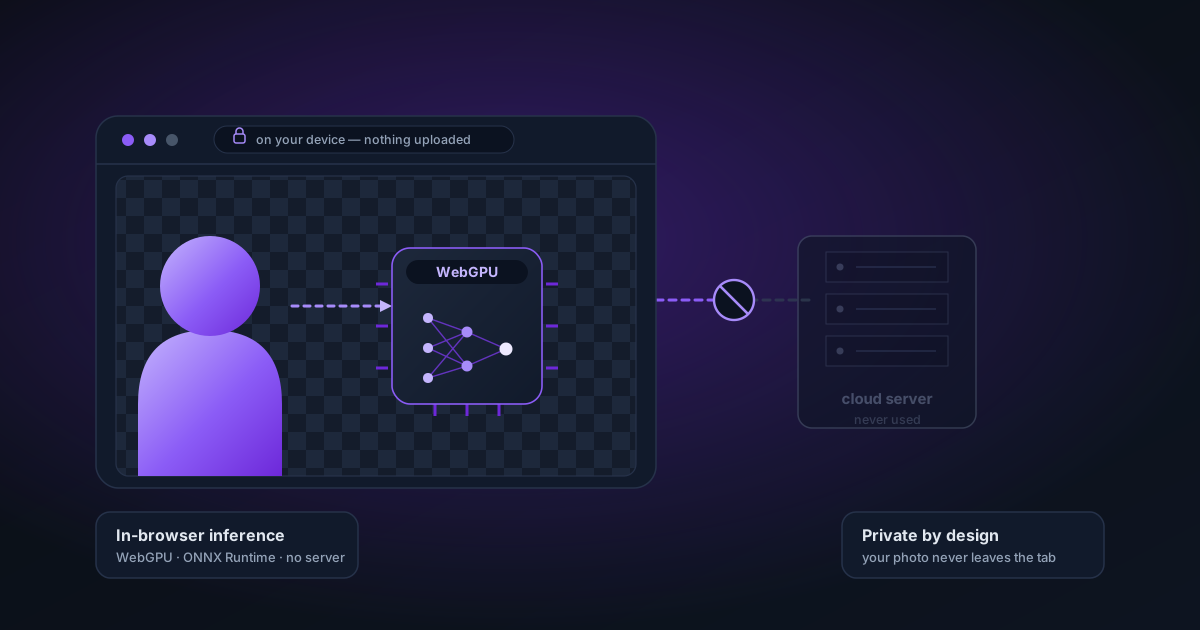
We built NSS Background Remover differently. The model runs in your browser. Your images never leave your device. This wasn't the easy path.
Here's why we did it, what it took, and what it cost.
The Privacy Problem with Server-Side AI
When you upload an image to a typical AI tool, you're trusting a lot:
- That the company deletes your image after processing (and that their deletion is immediate and complete, not eventual)
- That their servers are secure and won't be breached
- That their privacy policy means what it says and isn't amended later
- That the image data isn't retained for model training
- That the service stays online when you need it
For most product photos, these might seem like acceptable risks. But for personal photos — family portraits, pet photos, photos with people's faces in them — "just trust us" isn't good enough.
And even for product photos: if you're working on unreleased product designs, competitive research, or confidential marketing materials, uploading to a third-party server means that data is, technically, in a third party's hands.
Browser-based processing eliminates the trust requirement entirely. We physically cannot have your images because they never travel over a network. The code runs on your hardware. We have no server to be breached.
The Technical Path: From Server API to Browser AI
Running ML inference in a browser used to be aspirational. In 2024–2026, it became genuinely practical. Three things made it possible:
WebAssembly (WASM)
WASM allows compiled code — including neural network inference engines — to run in the browser at near-native speed. Earlier browser AI attempts were slow because JavaScript is slow for the kinds of matrix operations that neural networks require. WASM changed that.
The background removal models we use are compiled to WASM and run through ONNX Runtime Web. On most modern devices, WASM inference completes in 3–10 seconds for a typical image.
WebGPU
WebGPU (stabilised in Chrome 2023, Safari 2024) gives web applications access to the GPU — the same hardware that trains AI models in data centres. When WebGPU is available, inference is 5–10× faster than WASM. A 15-second WASM job completes in 2–3 seconds on WebGPU.
We implemented a backend detection chain: healthy hardware WebGPU first, then a single-threaded WASM fallback. That conservative CPU path avoids the heap-contention failures we measured on large segmentation models.
Hugging Face Transformers.js
ORMBG and BiRefNet — the models we use — are available as ONNX exports on Hugging Face. Transformers.js provides the JavaScript wrapper that loads these models, manages memory, and runs inference with a minimal API.
We load models lazily (on first use, not on page load), cache them in the browser after the first download, and retry with exponential backoff on network failures. The initial model load is the main wait — subsequent uses are instant.
What We Gave Up
Honesty requires acknowledging the trade-offs.
Speed on first run. The first time you use a model, it downloads from Hugging Face's CDN — about 45MB for ORMBG and 145MB for BiRefNet. On a typical broadband connection, that's 30–60 seconds the first time. After that, the model is cached locally and loads in under a second.
Hardware ceiling. Processing a 4096 × 4096 image on a 2016 MacBook Pro takes longer than on our development machine. We can't throw more cloud GPUs at the problem — you get whatever hardware you're running on. We've optimised for this (downscaling for inference, upscaling the mask at full resolution) but there's a real ceiling.
No server-side improvements. A server-based tool can update its model silently on the backend — every user gets the improvement immediately. We have to ship a new version, users have to update their cached assets, and the improvement lands days or weeks later. This is a meaningful product constraint.
Some browsers won't work as well. WebGPU isn't available on all browsers (notably, some mobile browsers). We fall back to WASM, which is slower but functional. A 2019 iPhone on iOS 15 has a notably different experience than a 2024 MacBook on Chrome. We show capability warnings for degraded experiences, but we can't magically improve old hardware.
No API (yet). Server-based tools offer API access — integrate background removal into your app or workflow with a single API call. We can't offer that with browser-only processing. An API is on the roadmap, but it requires a different architecture from what we ship today.
The Alpha Pipeline Problem
The privacy reason was our first motivation. The technical motivation was the alpha channel problem.
Most online background removers produce PNG files that show a black background when opened in Photoshop. The cause is premultiplied alpha — a shortcut taken during encoding that destroys colour information at transparent pixels.
When we built the pipeline ourselves, we controlled every stage:
- Float32Array for all mask operations (never quantised to uint8 until final write)
Math.round(maskValue * 255)at the final pixel write — nevermaskValue > 0.5 ? 255 : 0- Original RGB values preserved even at alpha=0
- Straight alpha output from every encoder (PNG, WebP, AVIF)
- Post-encode integrity check: the output is decoded and sampled to verify alpha is non-binary and RGB is correct
A server-based tool could implement this correctly. Most don't, because the black-in-Photoshop behaviour isn't visible when the tool shows a preview against its own white background. The user only discovers the problem when they take the file into their workflow.
What "100% Client-Side" Actually Means
When we say your images never leave the browser, we mean it literally. There is no network traffic from the image itself:
- The image is decoded in your browser's memory
- Inference runs on your GPU or CPU via WebGPU or WASM
- The mask is generated in JavaScript memory
- Export encoding happens in browser memory
- The download is a data URL or Blob URL — local memory transferred to your local filesystem
The only external network traffic is:
- Loading the application HTML, JS, CSS from Vercel's CDN on first visit (standard website loading)
- Downloading the model weights from Hugging Face on first use (this is the model, not your image)
- Optional analytics (Google Analytics) — strictly opt-in in every region: it loads only if you accept analytics cookies, and it never contains image data, only aggregated usage metrics
We verify this in our own testing: with network DevTools open, there are zero outbound requests that contain image data, file names, or any image-derived information.
Why It's Also Just Better
Privacy aside — for the use case of single-image and batch processing, browser-based AI is genuinely the right model.
There's no file size limit. No per-image credit system. No account required. No subscription tier that unlocks "higher quality" processing. You install nothing.
The inference models run the same code on your machine as they would on our server. The quality is identical.
And it's free, with no per-usage cost, because we have no compute bill from your images. The ads on the site cover development costs. The product is the tool, not the data.
That's the trade we made. We think it was the right one.
Applies to NSS Background Remover v2.4.0 — the release that was current when this article was last updated.
Was this article helpful?
Your answer is saved in this browser only. This control makes no network request and does not send the answer to an NSS feedback endpoint.