Best Color Spaces for Product Photography (sRGB vs Display P3 vs Adobe RGB)
Which color space should you use for product photos going online? sRGB, Display P3, and Adobe RGB compared — with specific advice for e-commerce, print, and background removal.
By Novus Stream Solutions Editorial Team · Part of the Image processing and on-device AI topic cluster
Colour spaces are one of those topics where bad information spreads fast. You'll hear "always shoot in Adobe RGB" or "Display P3 is the future" — but for product photography going to e-commerce platforms, most of that advice will make your photos look worse, not better.
Here's what actually matters.
What a Colour Space Is
A colour space defines a range (gamut) of colours that can be represented by a set of numbers. When your camera captures an image, it records light values — but those values only mean something specific when you attach a colour space profile that says "red=255 means this specific red."
Without a colour space tag (an ICC profile), a number has no colour meaning. The same file can display completely differently in two applications if they interpret the numbers differently.
The three colour spaces you'll encounter in product photography:
sRGB
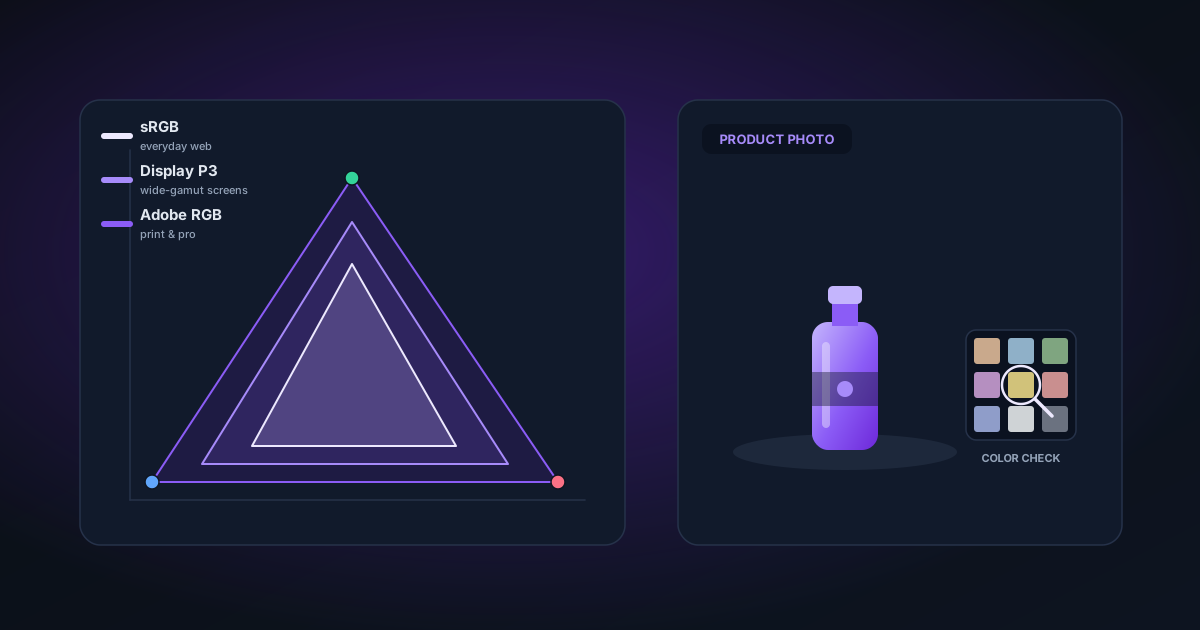
The internet's native colour space. Defined in 1996 by HP and Microsoft as a standard for monitors, web browsers, and most display devices. sRGB covers about 35% of visible colour.
Every web browser, every e-commerce platform, every phone interprets untagged images as sRGB and renders tagged sRGB images correctly.
Adobe RGB
A wider gamut than sRGB — covers about 50% of visible colour. Adobe RGB can represent more saturated colours, particularly in the cyan-green range. It was designed for print workflows where presses can hit colours that sRGB monitors can't display.
The problem for web use: Adobe RGB images displayed on sRGB devices (which is almost everything) look desaturated and flat unless the browser correctly handles the colour profile. Historically, most browsers didn't. Support has improved, but the profile must be embedded and the display software must honour it.
Display P3
A wide gamut colour space developed by Apple (now used in iPhone, iPad, Mac displays, and many high-end Android displays). Display P3 covers about 45% of visible colour and is increasingly common for screen-first content.
Unlike Adobe RGB which targets print, Display P3 was designed for digital displays. More saturated reds and greens. If you're shooting product photos that will be viewed on modern Apple hardware, Display P3 images display noticeably richer colours.
Which to Use for E-commerce
Use sRGB. Full stop, for most sellers.
Here's why: Amazon, Shopify, Etsy, and most e-commerce platforms convert uploaded images to their own format for serving. If you upload an Adobe RGB or Display P3 image, the platform may strip the ICC profile or apply a flat conversion — and your colours will shift, often severely.
Even when platforms handle profiles correctly, the buyers viewing your listing are on a mix of devices — older monitors, budget Android phones, laptops with poor colour accuracy. An sRGB image looks consistent and correct across all of them. A Display P3 image looks richer on an iPhone 15 and flat everywhere else.
The practical rule: Shoot and edit in your camera's native colour space (often Adobe RGB or P3), then convert to sRGB on export before uploading anywhere online.
When Adobe RGB or Display P3 Makes Sense
- Print-on-demand: If your products include artwork that will be printed (canvas, photo books, apparel), deliver files in Adobe RGB to the print lab. Their presses can reach those saturation levels.
- Professional portfolio: If you're delivering photos to art buyers or galleries who will print them, shoot and deliver in Adobe RGB.
- Apple-ecosystem brands: If your audience is almost entirely on Apple hardware and you're delivering assets for iOS apps, Display P3 source files are worth keeping.
For everything else — Etsy, Amazon, Shopify, Instagram, your own website — sRGB is correct.
Colour Spaces and Background Removal
Background removal adds a specific complexity: colour spill.
When you photograph a red product on a green background and remove that background, some green light from the background bounces onto the edges of your product. This creates a green fringe along the product edges in the cutout — the green literally contaminated the red.
This colour contamination problem is worsened by wide-gamut colour spaces. A Display P3 image has more distinct, saturated greens — the spill is more saturated and harder to fix.
NSS Background Remover includes edge decontamination: a Lab colourspace algorithm that detects semi-transparent edge pixels and pushes their colour toward the clean foreground colour, reducing spill. This runs automatically in the background at 50% strength, and you can increase it in the Edge Refinement tool.
The Lab Colourspace Advantage
Lab (CIELAB) is a perceptually uniform colour space — changes in L, a, and b numbers correspond to roughly equal perceptual differences in colour. It's not a camera capture format; it's an intermediate representation used for precise colour math.
Our decontamination algorithm works in Lab rather than RGB because:
- Colour differences are more accurately measured
- Hue shifts are predictable and correctable
- The algorithm can separate "hue change from spill" from "intentional edge softness"
The result is cleaner product edges regardless of what colour space your original was shot in.
Checking Your Export
After removing a background and exporting, verify your colour profile:
In Photoshop: Image → Mode — should show 8 Bits/Channel and document profile should be sRGB IEC61966-2.1.
In macOS Preview: Tools → Show Inspector → (i) tab → "Color Model" and "Profile."
In Chrome: There's no direct UI, but you can use DevTools → More Tools → CSS Overview → Colours to see if anything looks unexpected.
If your export doesn't have an embedded sRGB profile, most browsers will assume sRGB anyway — but it's cleaner to embed explicitly, especially for print deliverables.
Summary
| Use case | Colour space |
|---|---|
| E-commerce (Amazon, Etsy, Shopify) | sRGB |
| Social media | sRGB |
| Print-on-demand | Adobe RGB |
| Professional print delivery | Adobe RGB |
| Apple device-focused digital | Display P3 |
| Source file archival | Shoot in widest available, convert at export |
The goal is consistency and predictability. An sRGB product photo looks right on every device, every platform, every browser. That predictability is worth more than marginal colour accuracy that only shows up on high-end displays.
Applies to NSS Background Remover v0.2.0 — the release that was current when this article was published.
Was this article helpful?
Your answer is saved in this browser only. This control makes no network request and does not send the answer to an NSS feedback endpoint.