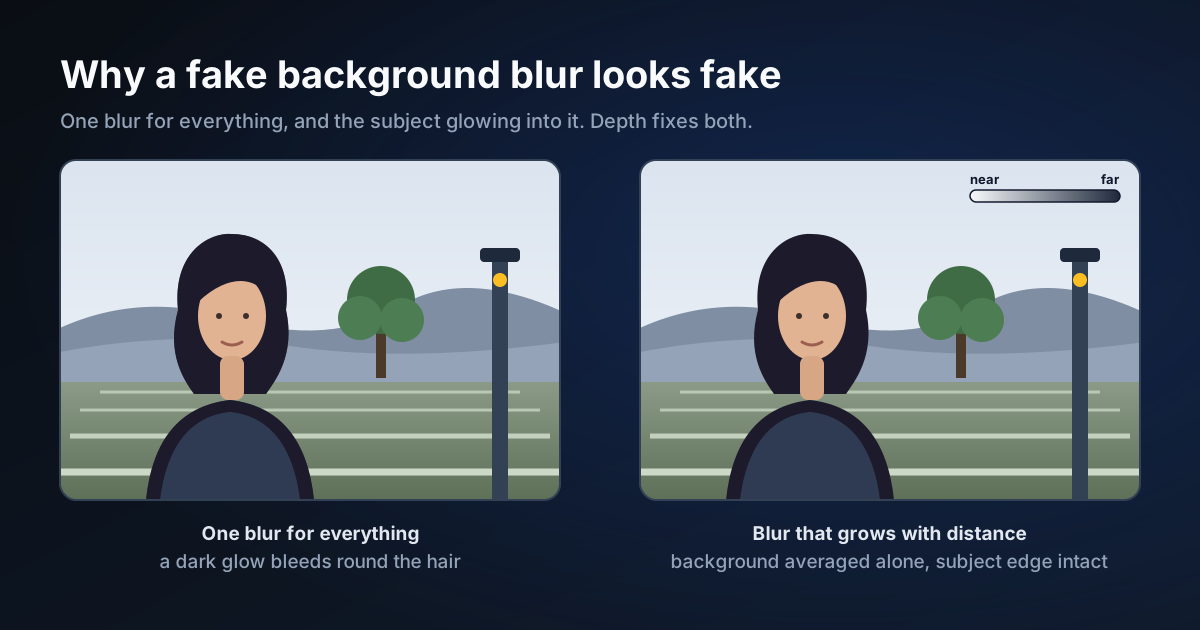
Why a Fake Background Blur Looks Fake, and What Depth Fixes
Two things give away a background blur added after the photo was taken: everything behind the subject is equally blurred, and the subject's own colours glow into the backdrop. What causes each, how a depth map and a subject outline fix them, and what they still cannot do.
By Novus Stream Solutions Editorial Team · Part of the Image processing and on-device AI topic cluster
A background blur added after the fact usually gives itself away in one of two ways. Both are easy to see once you know where to look, and both have a specific cause.
Tell one: everything is equally blurred
Through a real lens, how blurred something is depends on how far it is from what you focused on. A wall a step behind someone is a little soft; a hillside behind them is a wash of colour. The size of the blur is proportional to the difference in inverse distance, one over the distance, between the thing and the focus.
A blur applied with one radius ignores all of that. The wall and the hillside get the same treatment, the ground under the subject's feet is as blurred as the horizon, and the photo reads as a cutout pasted onto a smudge.
Tell two: the glow round the edge
The simplest way to fake the effect is to blur the whole photo and paste the sharp subject back on top. The problem is the first step. Blurring the whole photo also blurs the subject, so every background pixel near the subject becomes an average that includes the subject's colours. Paste the subject back and those pixels remain, as a pale glow round dark hair or a dark rim round a pale face.
What fixes each
A depth map fixes the flat blur. A monocular depth model estimates, from a single photo, how far away each part of it is relative to the rest. Depth Anything, the model family we use, predicts relative inverse depth, which is the quantity the blur circle depends on, so the blur can grow with distance the way a lens's does. Anything close to the focus distance stays sharp, in front of the focus as well as behind it.
Leaving the subject out of the blur fixes the glow. Instead of blurring everything, blur only the background: weight every pixel by how much it is NOT subject, blur the weighted colours and the weights, and divide one by the other. A background pixel next to the subject is then an average of background pixels only. The subject goes back on top with its own soft edge, so the edge is exactly as fine as the outline: a strand of hair the outline takes in stays sharp, and one it misses is treated as background and blurs with it.
What we saw
We ran this on five photorealistic test images before building anything around it: a portrait, a dog on grass, headphones on a table, a receding street and a barista in a busy cafe. All five were computer-generated, not taken with a camera. Near and far came out in the right order in every depth map. Beside a single-radius blur of the same photos, the glow round the subject was gone, and the background fell away with distance instead of all at once.
One result we had not planned for: in the cafe image the subject outline missed part of the barista's face, and a single-radius blur softened it. With depth, that part of the face stayed sharp anyway, because it was at the focus distance.
What it still cannot do
- No bokeh discs. A smooth blur turns a bright point into a soft glow, not the round highlight a lens makes.
- The depth is an estimate. It was right on all five of our test images, and it can still be wrong. We have not tested glass, mirrors or reflections.
- Blurred things in front. Where something blurred in the foreground overlaps something sharp behind it, its edge stays crisper than a lens would leave it.
- It needs the outline for fine edges. Without the subject outline the edge follows the depth map, which is coarser than the photo, and hair suffers first. With it, the finest stray hairs the outline misses still blur with the background.
Trying it
Portrait Blur does all of this in your browser. The depth model is a 100 MB download the first time you allow it, the subject outline uses the site's Fast background remover, and your photo is never uploaded. If you are not sure whether you want a blurred background or none at all, portrait blur vs background removal covers when each one is the right choice.
Applies to NSS Background Remover v2.6.2, the release that was current when this article was published.
Was this article helpful?
Your answer is saved in this browser only. This control makes no network request and does not send the answer to an NSS feedback endpoint.