Why Our Best-Quality Background Remover Runs on WASM, Not WebGPU
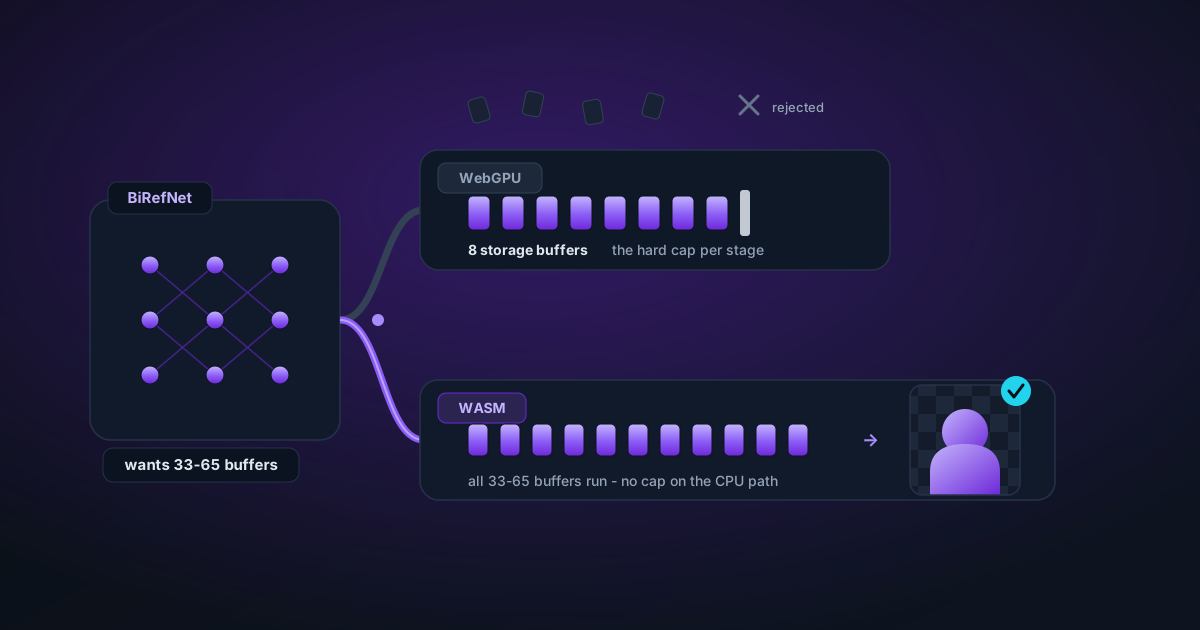
WebGPU guarantees only 8 storage buffers per shader stage. BiRefNet's graph wants 33–65. That single number decides where our best-quality model runs, and why "just use the GPU" isn't an option.
By Novus Stream Solutions Editorial Team · Part of the Image processing and on-device AI topic cluster
Running a model in the browser is not only a question of whether the weights fit in memory. The intermediate tensors created during inference can be much larger than the download itself. That distinction explained a stubborn Best Quality failure in our background remover.
Why the 1024px graph failed after loading
Our earlier BiRefNet Lite ONNX model accepted a fixed 1024 × 1024 input. Its 224 MB fp32 weights downloaded and the ONNX session could initialize, but the decoder created enough multi-scale intermediate data to exceed ONNX Runtime Web's working heap during the first forward pass.
The browser reported numeric-only errors such as 240595976. Those numbers were not input names or corrupt image data. They were the visible symptom of a native allocation failure inside the WASM runtime. Switching that same graph to fp16 did not solve the problem on CPU because several required fp16 operators lacked WASM kernels.
The browser-ready 512px export
Best Quality now uses the studioludens/birefnet-lite-512 ONNX export. It is built from the same BiRefNet Lite checkpoint but uses a fixed 512 × 512 input. Halving both dimensions reduces the largest image-shaped intermediate tensors by roughly four times.
The smaller graph provides two useful runtime variants:
- WebGPU fp16 (~99 MB): the preferred path on a healthy hardware adapter.
- WASM fp32 (~192 MB): a CPU compatibility path for browsers without usable WebGPU or for a GPU execution failure.
The output is still expanded to the source image dimensions before our edge-guided cleanup runs. Exports retain their original resolution; 512px is the segmentation model's working resolution, not the final image size.
The fallback order is deliberate
Selecting Best Quality now starts one BiRefNet worker and follows a bounded sequence:
- Detect whether the browser exposes a healthy WebGPU adapter.
- Run the 512px fp16 graph on WebGPU when available.
- If GPU loading or inference fails, dispose that session and retry the 512px fp32 graph on WASM.
- Only if both Best Quality paths fail does a fresh worker run the Fast model.
This matters because a computer can have a powerful GPU while the browser still loses a WebGPU device, rejects an operator, or applies a platform-specific limit. Hardware specifications alone cannot prove that a browser execution provider will complete a particular ONNX graph.
Honest diagnostics
The processor records the requested and bound execution provider and reports both Best Quality errors if WebGPU and WASM fail. A Fast result is still delivered as a final safety net, but it is labelled as a fallback rather than presented as a successful Best Quality run.
That is the practical rule for client-side ML: choose a graph that fits the browser first, use the GPU when it is genuinely available, and keep a separate CPU path that is known to execute.
Applies to NSS Background Remover v1.5.0 — the release that was current when this article was published.
Was this article helpful?
Your answer is saved in this browser only. This control makes no network request and does not send the answer to an NSS feedback endpoint.