fp32, fp16 and int8: What Model Precision Means for Your Cutouts
Fast or Best Quality? The real difference is how many bits each number in the model uses. Here's what fp32, fp16 and int8 do to your cutout's size, speed and edges.
By Novus Stream Solutions Editorial Team · Part of the Image processing and on-device AI topic cluster
Flip the background remover from Fast to Best Quality and two things change that you can actually measure: the download gets bigger, and the first cutout takes a little longer to appear. Both trace back to a single decision made long before the model ever reached your browser, how many bits each of its numbers is allowed to use.
That decision has a name: precision. It is one of the least glamorous settings in machine learning and one of the most consequential for a tool like this, where the whole thing runs on your own device with your own memory and your own patience. This is a look at what fp32, fp16 and int8 mean in plain terms, and how each maps to download size, speed, memory and the quality of the edge you end up cutting.
A model is millions of numbers
A background-removal model is, underneath, a very long list of numbers called weights: the values it learned during training. A mid-sized segmentation model might carry somewhere in the region of 40 to 200 million of them. To produce a cutout, your device multiplies your image against those numbers, over and over.
Precision is simply how much space each of those numbers gets. More bits per number means finer detail and a wider range of values; fewer bits means a coarser approximation that takes less room and less effort to crunch.
The three you will run into, from most generous to most frugal:
- fp32: 32-bit floating point. 4 bytes per weight. The format models are usually trained in.
- fp16: 16-bit floating point, sometimes called half precision. 2 bytes per weight.
- int8: 8-bit integer. 1 byte per weight. This is a quantised model: the smooth range of floating-point values has been squeezed onto 256 integer steps.
The arithmetic that follows is the whole story. Halve the bits and you roughly halve the download. Quarter them and you quarter it.
fp32: the reference copy
fp32 is the model as trained, nothing thrown away. Every weight keeps its full range and its fine gradations, which is exactly what you want when the alpha channel has to describe a soft transition rather than a hard on/off. It is the benchmark the other two are measured against.
The cost is size and effort. It is the largest file to fetch and the heaviest to hold in memory, and on a CPU it is not fast. You rarely need the full 32 bits for a background cutout, but when you are chasing the cleanest possible edge on a difficult subject, it is the honest baseline.
fp16: half the size, almost none of the loss
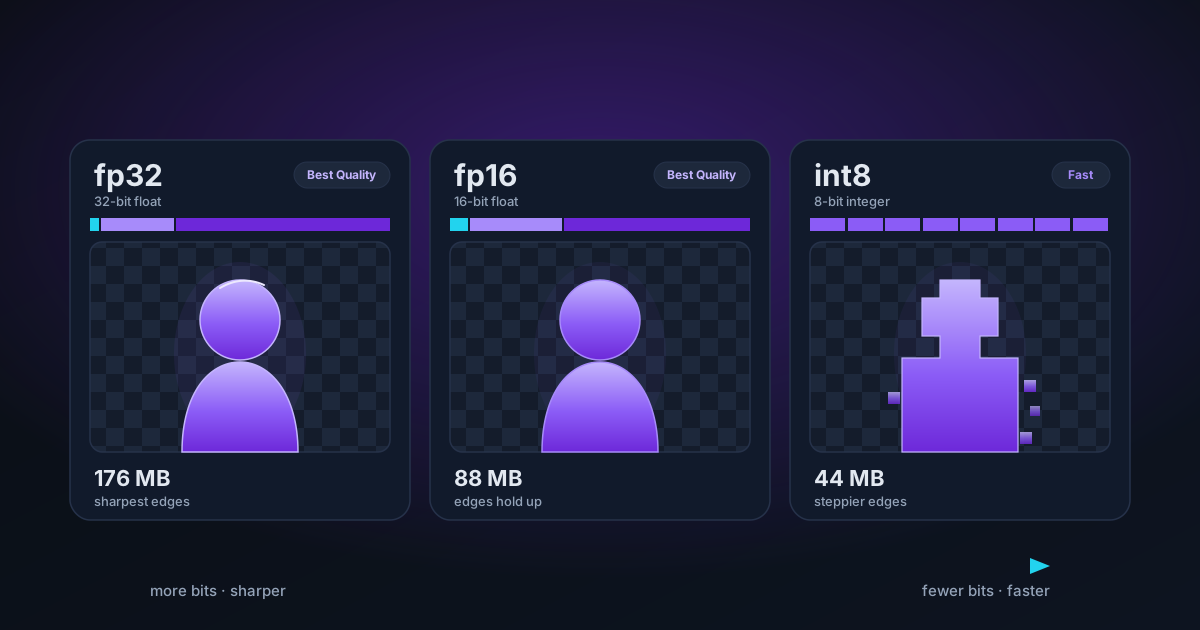
fp16 keeps floating-point behaviour but in half the space. For most segmentation work the visible difference against fp32 is close to nothing (the edges look the same, the semi-transparent regions behave the same), while the download and the memory footprint drop by roughly half.
The catch is hardware. fp16 shines on a GPU built to run it. On a plain CPU path there is often little speed benefit, and some devices need a specific capability flag before they will run 16-bit maths in a shader at all. It is a GPU-era format that happens to be very well suited to WebGPU when the device cooperates.
int8: small, quick, and a little rougher
Quantisation to int8 is the aggressive option. Those millions of floating-point weights get mapped onto whole-number steps, shrinking the file to about a quarter of fp32 and letting a CPU tear through the maths, because integer arithmetic is cheap and integer-heavy code vectorises nicely with SIMD.
There is a real quality cost, but it is smaller and more specific than people expect. On a mug against a white sweep you will not see it. Where it turns up is in the fiddly places: a fringe of hair, pet fur, a chain-link of jewellery, the soft blur at the trailing edge of a moving subject. Fewer available values can mean a slightly coarser alpha gradient: an edge that is a touch blockier, or faint banding where a clean feather should be. Whether that matters depends entirely on your subject.
The tradeoff in one table
| Precision | Bits/weight | Download vs fp32 | CPU speed | Edge on hard subjects | Where it feels at home |
|---|---|---|---|---|---|
| fp32 | 32 | 1× (largest) | Slowest | Best, most forgiving | High-fidelity, GPU or CPU |
| fp16 | 16 | ~½× | Modest gain | Effectively as good | GPU / WebGPU with f16 support |
| int8 | 8 | ~¼× | Fastest | Good; softer on fine detail | CPU / WASM, mobile, low memory |
Treat the download column as illustrative arithmetic, not a spec. A model with 44 million weights works out near 176 MB at fp32, about 88 MB at fp16 and roughly 44 MB at int8. The ratios hold regardless of the exact model.
Which runtime pairs with which precision
Precision does not travel alone. It tends to arrive attached to a runtime: the engine that runs the model in your browser.
WebGPU talks to your graphics card. It is happiest with floating point, and when a device supports 16-bit shader maths it can run fp16 quickly with a small memory bill. That is the natural pairing: a capable GPU, a half-precision model, fast frames.
WASM runs on the CPU. It cannot match a GPU for raw throughput, but it is dependable and available on essentially every device, and it is very good at integer maths, which is precisely what a quantised int8 model needs. Small file, no GPU required, works on the phone in your pocket.
The tidy version (WebGPU for high precision, WASM for quantised) is a useful default but not a rule, and this site is the exception that proves it. Here, the Best Quality path runs on WASM by deliberate choice, not because WASM is the fast lane. The reason has nothing to do with precision and everything to do with a specific rendering bug on the GPU path, which we pull apart in why Best Quality background removal runs on WASM. Read those two posts together: that one is about which engine, this one is about how many bits. They are separate knobs that happen to get set at the same time.
Which should you pick
The Fast and Best Quality modes are precision-and-runtime choices dressed up as plain words. Fast leans on a lighter, quantised model that downloads quickly and runs anywhere; Best Quality reaches for a higher-precision one that costs more to fetch and more to compute, in exchange for a cleaner edge where it counts.
A quick way to decide:
- Solid subject, clean background: a bottle, a box, a phone. Fast is plenty. You will not see the extra bits, and you will not wait for them.
- Hair, fur, feathers, foliage, motion blur, mesh: reach for Best Quality. This is the exact situation where higher precision earns its download.
- On mobile data or a tight-memory device: start with Fast. The smaller model is the difference between a cutout and a stalled tab.
- Doing it once, want it right: Best Quality. Fetch the larger model, keep it cached, move on.
The same logic governs the image upscaler and the video upscaler, where a heavier, higher-precision model resolves fine texture that a quantised one smears, at the usual price in download and time.
And the honest limit: precision cannot rescue a bad source. If the original edge is out of focus, blown out or compressed into mush, no number format invents the detail that the camera never captured. Higher precision sharpens a decision the model can already make; it does not conjure information that was never there. When the input is that far gone, the fix is not a bigger model. It is a better photo.
The short version
- Precision = bits per weight. More bits: sharper edges, bigger download, more memory. Fewer bits: smaller, faster, slightly rougher on fine detail.
- fp32 is the full-fidelity reference; fp16 halves the size at almost no visible cost on a capable GPU; int8 quarters it and flies on a CPU, with a small hit to the hardest edges.
- WebGPU favours float, WASM favours quantised int8, but the runtime and the precision are two separate choices, and here Best Quality runs on WASM on purpose.
- Match the mode to the subject, not to habit. Fast for solids, Best Quality for hair and fur, and a re-shoot for anything the model genuinely cannot see.
Applies to NSS Background Remover v2.0.0 — the release that was current when this article was published.
Was this article helpful?
Your answer is saved in this browser only. This control makes no network request and does not send the answer to an NSS feedback endpoint.