The Math Behind Upscaling a 176px Thumbnail to 2048px
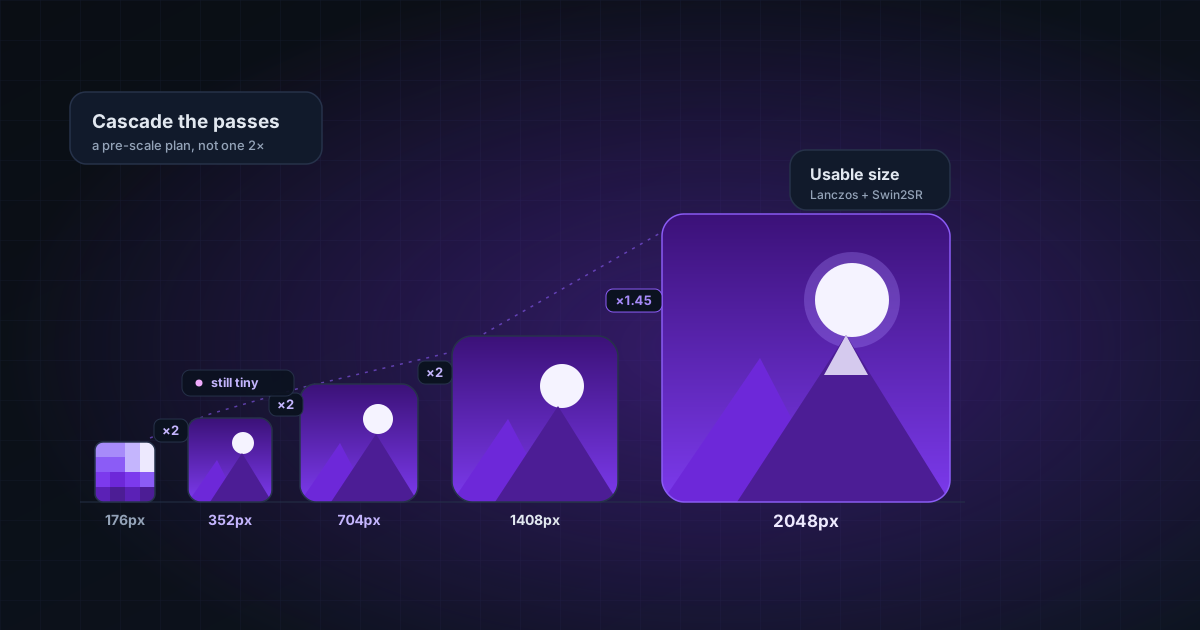
A fixed "2×" turns 176px into a still-tiny 352px. Real upscaling of small inputs needs a pre-scale plan and cascaded passes. The arithmetic we use to get a thumbnail to a usable size.
By Novus Stream Solutions Editorial Team · Part of the Image processing and on-device AI topic cluster
A user drops a 176×176 thumbnail into a "2× upscale" tool and expects a poster. They get 352×352: technically 2×, practically still a thumbnail. The naive reading of "2×" is the problem. Here's how we think about scaling small inputs so the output is actually useful.
Why "2×" is the wrong contract for small inputs
A fixed multiplier is fine for large inputs (2× a 2000px image is a meaningful 4000px). For small inputs it's almost useless: 2× of anything under ~500px is still small. What the user actually wants is a target resolution, not a multiplier.
So our upscaler plans toward minimum output sizes:
- 2× tier → at least 2048px on the long edge
- 4× tier → at least 4096px (4K) on the long edge
The pre-scale plan
Given a 176px input and a 2048px target, the required factor is:
2048 / 176 ≈ 11.6×
No single super-resolution pass does 11.6× well. Transformer/GAN upscalers (Swin2SR, Real-ESRGAN) are trained for fixed small factors (typically 2× or 4×). Asking one for 11.6× produces mush. So we split the work:
- Pre-scale the tiny input with a fast, artifact-free interpolation (WebGL Lanczos) up to the point where a learned pass can finish the job cleanly.
- AI pass(es) for the final factor, where the model's learned detail actually helps.
- Unsharp mask at the end to recover edge crispness lost to interpolation.
For larger inputs that already exceed the target, we scale proportionally instead of forcing a fixed multiple. There's no reason to push a 3000px image to 4× if 2048px is the goal.
Why we cascade instead of one big pass
A 4× result built as two 2× passes beats a single 4× pass on most content: each pass operates in the factor range it was trained for, and errors don't compound the way they do when you ask a 2× model to hallucinate 4× of new detail in one shot. The cost is a second pass of compute, which is why this lives behind a tier choice, not on by default for every image.
Two numbers that bit us
- The progress timer counted up instead of down on long jobs. That's two bugs: the ETA baseline being exceeded (so it showed elapsed), and a missing
content-lengthheader breaking the denominator the progress bar divides by. Fixing model delivery (so byte totals are known) is what makes a real countdown possible. - A "90-second tile stall": a single tile that never reported progress would hang the whole job until an 8-minute timeout. We added a per-tile health check that fails fast at 90s with an actionable message instead of a silent wait.
The takeaway
"Upscale" isn't multiplication; it's reaching a target resolution without inventing detail that wasn't earned. For small inputs that means a pre-scale plan and cascaded passes; for the UI it means honest ETAs that need real byte totals to compute. Get the arithmetic right and a 176px thumbnail becomes a genuinely usable 2048px image instead of a slightly-bigger thumbnail.
Applies to NSS Background Remover v1.5.0 — the release that was current when this article was published.
Was this article helpful?
Your answer is saved in this browser only. This control makes no network request and does not send the answer to an NSS feedback endpoint.