Segmentation vs Matting: Why a "Good" Mask Can Still Look Cut Out
A perfect outline still looks pasted when hair and fur need partial transparency. Here is why segmentation and matting are different jobs, and why the harder one costs more.
By Novus Stream Solutions Editorial Team · Part of the Image processing and on-device AI topic cluster
A studio shot of a ceramic mug and a portrait of someone caught in a gust of wind can come out of the same background remover. The mug looks flawless. The portrait looks like it was trimmed with nail scissors: a hard, slightly too-clean line where windblown hair should feather away into nothing. The shape is correct. The edge is wrong.
That gap, between "the outline is right" and "the cutout looks real", is the difference between two jobs that get lumped under one word and really shouldn't be. One is segmentation. The other is matting. Most of the time when a cutout looks pasted despite having the right silhouette, you are looking at good segmentation doing a job that needed matting.
If you want the full pipeline (model, mask, edges, output), how AI background removal actually works covers the whole chain. This piece drills into one link in it: the moment the model decides what each edge pixel is worth.
Segmentation draws a line
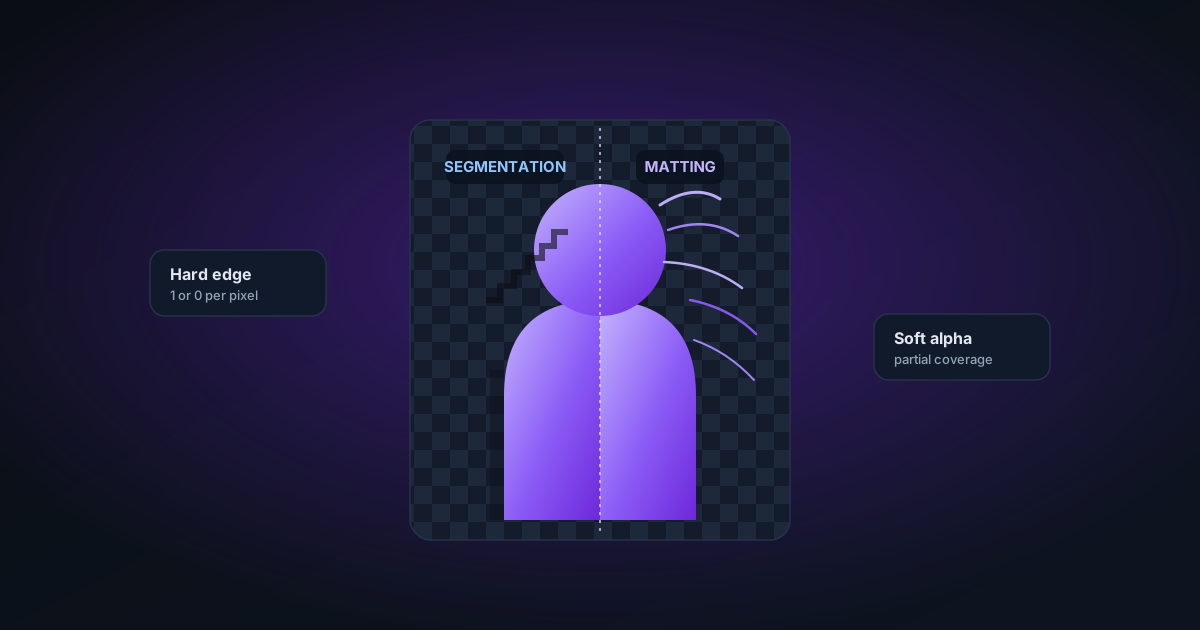
Segmentation answers exactly one question, once per pixel: subject, or not subject. Yes or no. The result is a binary mask: a black-and-white image the same size as your photo, where white means keep and black means drop, and there is meant to be nothing in between.
For a mug, that is the whole job done. A mug has a definite ceramic boundary. Every pixel is either glaze or backdrop, and the handful of edge pixels that straddle the line get smoothed with a bit of anti-aliasing so the curve does not look like a staircase. You get a clean cutout because the object genuinely has a clean edge.
The trouble starts wherever the real edge is not a line. Consider a single pixel sitting on the outer wisp of a ponytail. Physically, that pixel might be 30% hair and 70% whatever was behind it: a window, a wall, a bit of sky. Segmentation has no way to say "30%". It must round: subject or background, one or zero. Multiply that forced rounding across thousands of boundary pixels along a head of hair, a fur collar, a fern, or the frayed edge of a knitted jumper, and you get the sensation everyone recognises but few can name. It does not look torn or jagged. It looks cut out: because it was, from a shape that was never a shape.
The alpha channel is not a switch
Here is the part that reframes everything. A transparent PNG does not store "keep or drop". It stores an alpha channel: a per-pixel opacity value, typically 0 to 255 in an 8-bit image. Zero is fully transparent, 255 is fully opaque, and every value in between is partial coverage.
Segmentation only ever writes the two ends of that range. Matting fills in the middle. That is the entire distinction in one sentence: segmentation gives you a mask, matting gives you an alpha.
Matting treats each pixel as a mixture rather than a member. The classic way to write it is the compositing equation. The observed pixel colour I is the foreground colour F blended with the background colour B according to the alpha:
I = αF + (1 − α)B
For a hair pixel that is 30% strand over a bright window, alpha is about 0.3, and the pixel's colour is a genuine blend of dark hair and glare. Matting's job is to recover that alpha and estimate what the pure foreground colour F was underneath, so that when you drop the pixel onto a new background it blends correctly instead of dragging a rim of the old window with it.
This is why matting matters for exactly the subjects segmentation fails on:
- Hair and fur: thousands of edge strands, each partly covering the backdrop.
- Motion blur: a swinging hand or a wagging tail smears across pixels that are half subject, half background.
- Glass, smoke, veils, water spray: semi-transparent by nature, so even the interior pixels are not fully opaque.
- Soft or defocused edges: a shallow depth of field turns a crisp outline into a gradient the eye reads as depth.
Drop a matted cutout onto a new colour and the halo problem largely disappears, because the edge pixels carry honest partial transparency instead of a hard verdict.
What a trimap actually is
The concept that connects the two is the trimap. Split the image into three regions rather than two:
- Definite foreground: pixels you are certain are subject (alpha = 1).
- Definite background: pixels you are certain are not (alpha = 0).
- Unknown: a band along every soft edge where the answer is a fraction.
Segmentation, in effect, is a trimap with the unknown band crushed to zero width. Matting is the work of solving that unknown band: for every pixel in it, estimate the alpha and un-mix the colour.
The older generation of matting tools made you draw the trimap by hand: paint the sure-foreground, paint the sure-background, leave a rough band around the hair, and let the algorithm solve the rest. Modern in-browser models estimate the trimap themselves from a first-pass segmentation, then refine the edge band into a real alpha. You never see the trimap, but it is the quiet step that decides whether your ponytail feathers or snaps.
Why the good version costs more
Matting is genuinely harder than segmentation, and not by a little. Two reasons.
First, it is underdetermined. Look again at I = αF + (1 − α)B. For a colour image you know I. The three RGB numbers you can see. You are trying to solve for alpha, for F, and often for B. That is up to seven unknowns per pixel against three knowns. There is no single correct answer; the model has to lean on context, learned priors, and neighbouring pixels to make a plausible guess. Segmentation, by contrast, is a straightforward classification: one label per pixel.
Second, it costs more compute. Producing a smooth, believable alpha across a whole head of hair needs a heavier model and more passes than deciding a coarse silhouette. That is precisely why serious tools ship a fast default and a slower best quality mode. On our background remover the higher-quality path is doing more matting work per edge pixel, so it takes longer and asks more of your device, a fair trade only when the subject has the kind of edge that needs it. For a solid product on a plain backdrop, the fast path already nails it and the extra cost buys you nothing.
The cost is even starker in video. A video editor has to solve this per frame, and edges wander frame to frame as the subject moves, so the alpha has to stay stable over time or the cutout shimmers. That is a lot of matting, many times a second.
When segmentation is enough, and when nothing helps
Being honest about limits is the whole point here.
Segmentation is plenty for hard-edged objects: bottles, boxes, phones, tools, most packaged products, anything with a clean manufactured boundary. Reaching for matting there just spends time and can even soften an edge that should stay crisp.
Matting earns its cost on hair, fur, feathers, foliage, motion blur, and anything semi-transparent.
Nothing will save some images. Matting recovers detail that is present but mixed in the pixels; it cannot invent strands that a heavily compressed JPEG has already smeared into a grey mush, and no amount of edge refinement rescues a subject shot against a background the same colour as their hair. If F and B are identical, the equation has no signal to separate them. When alpha estimation has nothing to work with, you get either a hard line or a muddy smudge, and the right call is to re-shoot against a contrasting, evenly-lit backdrop rather than to keep clicking. Feeding a bigger image into an upscaler first can widen a too-thin edge band and give the matting step more to chew on, but it is a workaround, not a fix for a photo that never held the detail.
A short checklist for cleaner edges
- Match the tool to the edge. Hard-edged object? Fast segmentation is fine. Hair, fur, or blur? Use the best-quality/matting mode and accept the wait.
- Shoot against contrast. A background clearly different in colour and brightness from your subject's edges gives matting real signal to work with.
- Kill the colour spill. A coloured backdrop reflecting onto light hair poisons the foreground-colour estimate; neutral, diffuse light helps.
- Give it resolution. Wispy edges need pixels. A larger, less-compressed source has a wider unknown band to solve.
- Judge on a new background, not the checkerboard. Composite the cutout onto the colour you will actually use. Halos and hard lines only show up against real pixels.
Segmentation tells you where the subject is. Matting tells you how much of each edge pixel belongs to it. Both are useful; only one of them makes a windblown ponytail look like it was photographed rather than trimmed.
Applies to NSS Background Remover v2.0.0 — the release that was current when this article was published.
Was this article helpful?
Your answer is saved in this browser only. This control makes no network request and does not send the answer to an NSS feedback endpoint.