Clean Animated Product GIFs — Background Removal Without Soft-Edge Surprises
Turn product spins and logo loops into clean animated GIFs in the browser. Learn when colour-key beats AI, how temporal smoothing helps, why GIF only offers 1-bit alpha, and when APNG is the better export.
By Novus Stream Solutions Editorial Team · Part of the Browser-local editing workflows topic cluster
Animated product GIFs do a job still photos cannot: they show turn, flex, pour, or pack without forcing a shopper to open a video player. The catch is the background. A studio sweep or desktop clutter that looks fine in a full-bleed clip becomes noise the moment the loop sits on a white PDP, a dark theme, or a paid ad canvas.
This guide is for product and logo loops — Shopify embeds, site heroes, email-safe animations, ad creative — using the GIF background remover. If you are building chat stickers and emotes, the dedicated animated GIF sticker walkthrough goes deeper on tiny sizes and messaging quirks. The engine is the same; the brief is different.
Everything runs in your browser. Frames are not uploaded to finish the cut.
When an animated GIF is the right asset
Use a short transparent (or keyed) GIF when:
- The motion is simple and loops cleanly (a few seconds, not a film).
- The destination expects GIF (email clients, older CMS blocks, many ad units).
- File size and compatibility matter more than cinematic soft edges.
Prefer a still transparent PNG, a short WebM/MP4, or APNG when:
- Soft hair, glow, or motion blur is the product story.
- The platform accepts modern formats with full alpha.
- You need audio or longer narrative — that is video territory, not GIF.
Colour-key first, AI second
Drop the GIF into the GIF background remover. The tool chooses a path based on the source:
- Colour-key fast path — if the loop already sits on a flat, solid field (green screen, pure white, single studio paper), keying that colour is exact and fast. No model guesswork. Ideal for many product turntables shot on a controlled backdrop.
- Per-frame AI path — for photographic or busy backgrounds, each frame uses the same Fast / Best Quality ladder as still removal. Best Quality costs more time per frame; spend it when edges define the brand (packaging foil, fine logo strokes, soft fabric).
| Source background | Start with | Why |
|---|---|---|
| Flat green / white / single colour | Colour-key | Exact; preserves hard logo edges |
| Softbox studio with gradients | AI (often Best Quality) | Keying will leave bands |
| Lifestyle desk / shelf clutter | AI | No single key colour |
| Already almost clean | Colour-key, then spot-check | Avoid paying AI cost for nothing |
For still-image mode choice philosophy, Fast vs Best Quality still applies frame by frame.
Temporal smoothing keeps the loop calm
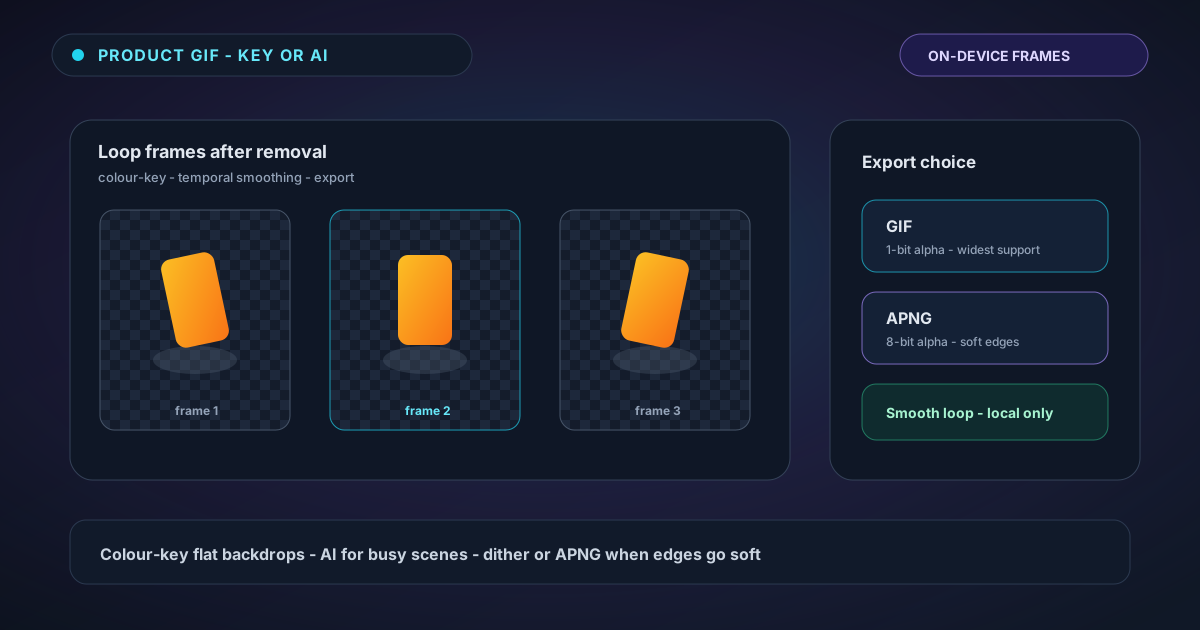
Independent per-frame masks can shimmer: an edge that jumps one pixel between frames reads as flicker when the GIF repeats. The GIF remover applies temporal smoothing across frames so the silhouette stays stable through the loop. For a product spin on a storefront, that stability matters as much as a single “hero” frame looking perfect.
If the source animation itself has a bad loop seam (last frame does not match the first), fix or trim the source before removal. Transparency makes loop seams more obvious, not less.
The GIF format’s hard limit (stated once, clearly)
GIF stores 1-bit alpha: each pixel is fully opaque or fully transparent. There is no 40% opacity. Soft hair, motion blur, and glows cannot be stored as true soft edges in a GIF, no matter which AI you use.
For hard-edged products and logos, that is fine. For soft subjects, you get jagged or chewed fringes unless you mitigate:
- Bayer dithering on the edge band — scatters on/off pixels so the eye reads a softer boundary at a distance. Good for unknown destinations.
- Matte colour — pre-composites soft edges against a known destination colour (e.g. your PDP white). Looks clean on that colour; wrong on others.
- Export APNG — full 8-bit alpha when the platform supports it. Same frame processing; better container for softness.
| Subject | Practical export |
|---|---|
| Hard logo / rigid product | GIF, plain 1-bit cutout |
| Soft fabric, slight blur, unknown page colour | GIF + dithering |
| Soft edges on a known white PDP | GIF + white matte, or APNG |
| Soft edges are mandatory | APNG (or video), not GIF |
Product-loop workflow
- Prep the source — short loop, consistent framing, trim dead frames. Prefer a controlled backdrop if you can reshoot; colour-key will thank you.
- Remove — colour-key when possible; otherwise Best Quality for brand-critical edges.
- Preview on the real destination colour — not only the editor checkerboard. A fringe invisible on grey may scream on white.
- Pick format — GIF for maximum compatibility; APNG when soft alpha matters and the CMS allows it; PNG-ZIP if you need frame files for another pipeline.
- Watch file size — more frames and dithered edges grow the palette. Short loops with restrained colour count stay under email and ad caps.
Mistakes that show up on the live site
| Mistake | Symptom | Fix |
|---|---|---|
| Forced GIF on wispy soft edges | Sparkly / bitten silhouette | Dither, matte, or switch to APNG |
| Matted for white, placed on dark theme | White halo | Rematte or use dither / APNG |
| No temporal smoothing awareness | Edge flicker every loop | Prefer the tool’s smoothed path; simplify motion |
| Huge frame count | Slow load, rejected upload | Trim frames; reduce canvas |
| Using the sticker guide’s tiny-size advice only | Product looks crude on PDP | Design for PDP scale; stickers are a different brief |
Privacy and one-time-use
Frames are processed locally. Large optional models may download once with consent, then cache like other NSS AI features. Close the tab when you are done; download exports you need first. There is no cloud render queue for the cut.
Try it on a real product loop
Open the GIF background remover, drop in a short product or logo animation, and try colour-key if the backdrop is flat. If edges are soft and the destination supports it, compare GIF dithering against APNG before you commit the asset to the storefront.
For chat-sized stickers and emoji packs, continue with the sticker transparency guide. For single product stills that need marketplace white after cutout, use the marketplace white finish pipeline on stills instead of forcing a GIF.
Applies to NSS Background Remover v2.3.0 — the release that was current when this article was published.
Was this article helpful?
Your answer is saved in this browser only. This control makes no network request and does not send the answer to an NSS feedback endpoint.