Which Blurs Can Be Recovered, and Which Are Simply Gone
Camera shake, focus miss, subject motion and noise all look like 'blurry' and only some of them are reversible. Here is what a deconvolution model can actually put back, the resolution trade the tool makes to run in a browser tab, and how to tell in advance whether a photo is worth the attempt.
By Novus Stream Solutions Editorial Team · Part of the Image processing and on-device AI topic cluster
There is a particular kind of photograph that makes people go looking for a deblur tool. One frame, of something that will not happen again, and it is soft. A child mid-laugh, a stage, a bird leaving a branch. You cannot reshoot it, so the only question is whether software can put back what the camera did not record.
The honest answer is that it depends entirely on which blur you have, and the difference is not cosmetic. Some blurs are a reversible operation with information still recoverable inside them. Others threw the information away. The two look identical when you are squinting at a thumbnail, which is why "can this be fixed" gets such unsatisfying answers.
Blur is an average, which is why it is sometimes reversible
Every kind of blur is the same operation underneath: each pixel in the result is a weighted average of a neighbourhood of the pixels that should have been there.
Camera shake is the most literal case. During a 1/15s exposure the sensor keeps integrating while the camera drifts along some short path, so each photosite accumulates light from a smear of scene points along that path rather than one. A focus miss does the same thing with a different shape — each point of light in the scene lands on the sensor as a small disc instead of a point, so every pixel is an average over that disc.
The reason this matters is that averaging is not deletion. A blurred edge still carries evidence about where the sharp edge was and how strong it was. In principle, if you knew the exact shape of the average, you could solve backwards for the original.
In practice you cannot solve it exactly, for two reasons that never go away. The averaging is many-to-one — more than one sharp scene produces the same blurred image — and the sensor added noise on top, which the inversion amplifies violently. This is what people mean when they call deconvolution ill-posed: there is not one answer, there is a family of them, and picking among them requires knowing something about what photographs generally look like.
That knowledge is what a learned deblur model is. It has seen a very large number of blurred-and-sharp photograph pairs, and what it contributes is not arithmetic but a preference — of all the sharp images that could have produced this blur, which one looks like a photograph.
The two things that can run when you press the button
AI Deblur has two paths and it is worth knowing which one you got, because they are not the same kind of operation at all.
NAFNet is the learned deconvolution described above. It is a 92 MB one-time download, cached afterwards, and it runs only when two conditions are both true: you have allowed the download, and the browser exposes a healthy WebGPU adapter. WebGPU is a genuine requirement here rather than a preference — on the single-threaded WASM path the model is slow enough that waiting for it is not a reasonable thing to ask of anyone.
The direction-aware unsharp mask is the other path, and it is what runs instantly with no download whenever either condition fails. It is worth being precise about what it does, because "sharpen" and "deblur" get used interchangeably and they are not the same claim. It blurs a copy of the image with a radius-5 Gaussian, subtracts that from the original to isolate the fine detail, multiplies that difference by a little under five, and adds it back. Then, if it detected a dominant direction in the image gradients, it runs a second sharpening pass perpendicular to that direction, on the theory that a motion streak needs its contrast rebuilt across the streak rather than along it.
The high-pass term is clamped to plus or minus 64 levels before it is added back. That clamp is the difference between a photo that reads as recovered and one that reads as crunchy: without it, a few very strong edges take the full multiplier and ring into bright and dark fringes, and the eye reads the ringing before it reads the sharpening.
None of that invents detail. It raises local contrast either side of edges that were already there, which the eye interprets as sharpness. On mild shake that is genuinely useful and it is instant. It is simply a different thing from reconstruction, and the caption under your result names which one produced it.
The resolution trade the model path makes
This is the part that surprises people, and it changes which path you should want.
Deblur is expensive, so before NAFNet runs, the tool plans a working size. The long edge is capped at 1024 px. The short edge is lifted to at least 384 px if that cap pushed it under. Both axes are bounded at 2048 px. The model runs at that planned size, and the result is then resampled back to the dimensions you uploaded.
So the file you download always has the pixel dimensions of the file you gave it — and the model's actual contribution is bounded by that working size. On a 1200 px web image, nothing meaningful is lost. On a 24-megapixel photograph, the reconstruction happened on roughly a 1024 px view of your image and was then enlarged between five and a half and six times, linearly, to meet the original frame — a 6000×4000 frame is 5.9x the 1024 px long edge, a 5657×4243 one is 5.5x.
The classical path has no such cap. It runs at the image's native resolution.
That inverts the advice you would expect. The model is the better answer when the blur is real and the image is not enormous — which is most web images, most crops, most phone photos you are about to post. On a very large file where you need full-resolution micro-detail, the instant no-download path can genuinely serve you better, because whatever it does it does at every pixel you actually have.
There is a related constraint at the small end. The model's graph declares both spatial dimensions as dynamic, and it is not: measured against the real weights, there is a hard per-axis floor somewhere between 368 px, which fails, and 372 px, which passes. It is per axis rather than per area — 512×256 and 256×512 both abort while 480×448 is fine. That is why the planner lifts the short edge to 384 rather than letting a wide panorama land under the floor and throw. The consequence for you is that a very wide crop is processed at that floor on its short axis, so fine detail in it is limited by the planner rather than by the model.
Which blurs are recoverable
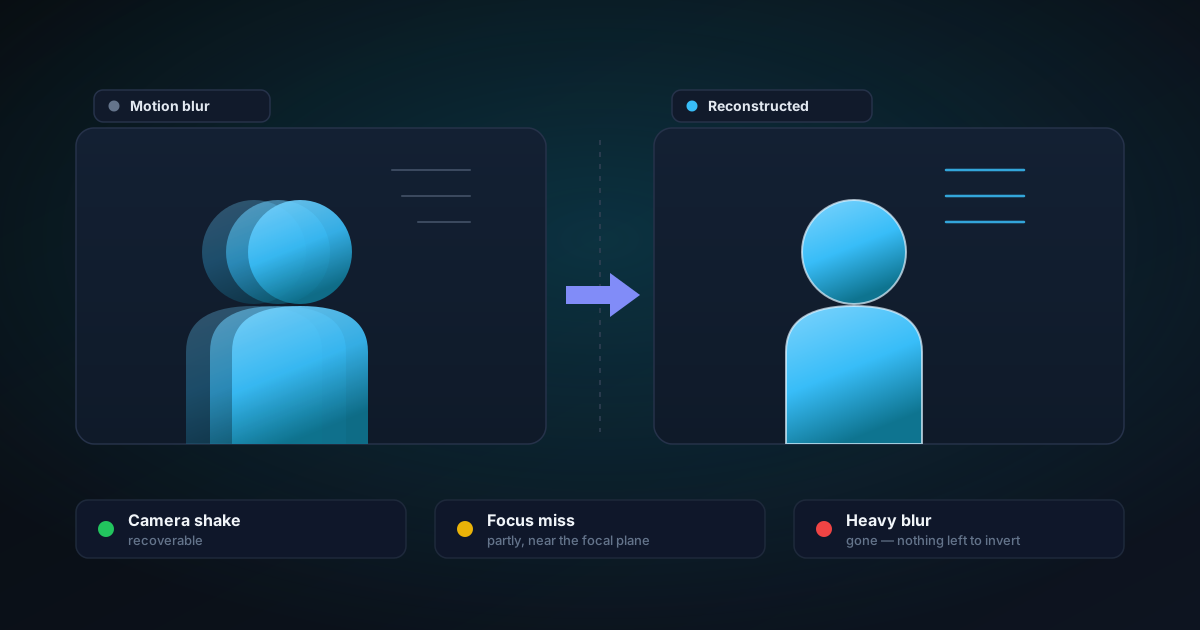
Handheld shake is the best case. A short, roughly straight streak from a hand that moved during the exposure is exactly the failure a motion-deblur model is trained on. This is where the difference between the two paths is most visible.
A slight focus miss is often recoverable, when the subject sits close enough to the focal plane that the disc each point spread into is still small. The further out of focus, the larger the disc, the more scene points got averaged into each pixel, and the less there is to work backwards from.
Subject motion is much harder than camera motion, and for a structural reason. Camera shake applies one smear to the whole frame. A moving subject in a still frame applies a smear to the subject and nothing to the background — different regions, different kernels. The classical path in particular estimates a single dominant gradient direction for the entire image, so on a photo where only the subject moved it will happily sharpen the stationary background across an axis that has nothing to do with it.
Noise is not blur, and deblurring makes it worse. Sensor noise from a dark scene is high-frequency detail, and everything above amplifies high-frequency detail. A noisy handheld night shot has both problems and the tool only addresses one of them, so the noise comes through harder. If your image is noisy first and soft second, deal with your expectations about the noise before you press anything.
Heavy blur is gone. If the streak is long, or the focus missed by a wide margin, the averaging destroyed the information and no prior recovers it. What a model can still do from that input is produce a sharp, confident, plausible image — which is a generated photograph rather than a restored one. That is a real distinction and it matters for the same reasons it matters in face restoration: nothing in the output flags which parts were invented.
What to do instead
If the reason you care about the photo is a face, face restore targets exactly that, with a prior specific to faces rather than to photographs in general. It does considerably more for a soft face than a whole-image deblur, and it comes with its own honest boundary about what a generated face is and is not appropriate for.
If the image is not blurred so much as small — a thumbnail, a screenshot, a saved-from-messaging copy — then softness is a resolution problem wearing a blur costume, and the fix is a different one. Choosing the right source mode on the upscaler covers that case properly.
If you are going to do both, do the deblur first and on the smaller file. A blur that survives into an upscale becomes a larger blur, and the model that upscales it will faithfully reconstruct the smear. A small image is also comfortably inside the working-size cap, so the resolution trade above costs you nothing.
And if the answer is that the photograph is not recoverable, that is a real answer. It is worth more than a confident sharp rendering of a moment that no longer matches what happened.
The short version
- Blur is an average, so some of it is reversible — but never exactly, and never without a prior.
- Two paths exist: NAFNet reconstructs, the unsharp mask raises contrast. The result names which one ran.
- NAFNet needs both an allowed download and WebGPU. Without either, you get the classical path.
- The model works at up to 1024 px on the long edge and the result is scaled back, so on very large files the classical full-resolution path can be the better trade.
- Camera shake and a slight focus miss are the recoverable cases. Subject motion, noise, and heavy blur are not.
- Deblur before upscaling, not after.
The mechanics, the consent gate and the exact size constraints are documented in the AI Deblur help article. All of it runs in your browser tab — the model comes to your image rather than the other way round.
Applies to NSS Background Remover v2.4.0 — the release that was current when this article was published.
Was this article helpful?
Your answer is saved in this browser only. This control makes no network request and does not send the answer to an NSS feedback endpoint.