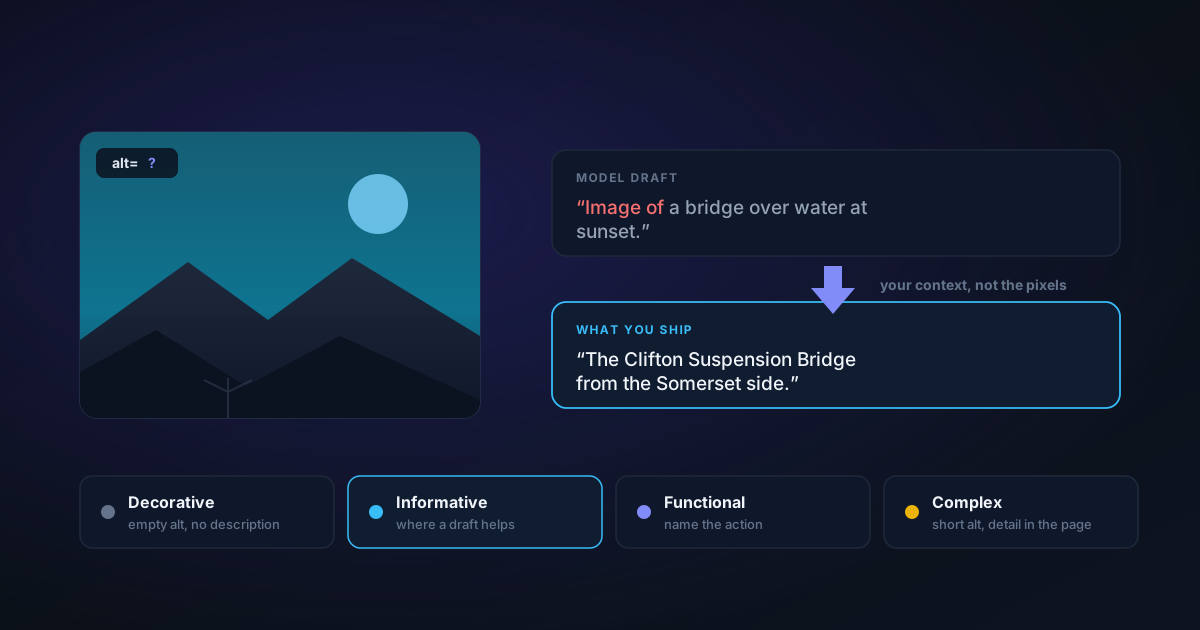
Writing Alt Text That Actually Helps — and Where an AI Caption Fits
Most images ship with no alt text because there are a hundred of them and no time. A captioning model that runs on your device fixes the blank-page problem but not the hard part. Here is the decision that comes before the writing, what the model can and cannot know, and the edit pass that turns a caption into alt text.
By Novus Stream Solutions Editorial Team · Part of the Browser-local editing workflows topic cluster
Almost nobody leaves alt text off an image out of indifference. They leave it off because there are ninety more images in the folder, the deadline is today, and writing ninety short descriptions is a genuinely tedious job that nothing about the CMS makes faster.
A model that hands you a first draft in a second changes that arithmetic. It does not, however, change the part that requires you — and being clear about which part is which is the difference between alt text that helps somebody and alt text that adds noise to a page that already had too much.
Alt text is a replacement, not a description
This is the single idea that makes everything else follow, and it is the one most guides skip.
Alt text is not a caption of the image. It is what stands in for the image when the image is not available — because a screen reader is reading the page aloud, because the file failed to load, because the connection is slow, because someone is using a text-only view. The question it answers is not "what is in this picture" but "what would this reader miss if the picture were simply not here".
Which means the right alt text depends on the page, not only on the photograph. The same shot of a bridge wants the Clifton Suspension Bridge seen from the Somerset side in an article about Bristol, and a suspension bridge at dusk in a piece about lighting. Nothing about the pixels distinguishes those two. Only the sentence next to them does.
A model can produce the second one. It cannot produce the first, and it never will, because the information is not in the image.
The decision that comes before the writing
Before you describe anything, work out which of four jobs the image is doing on the page. This takes about two seconds per image once you have the habit, and it decides everything after.
Decorative. A background flourish, a divider, a stock photo of hands on a keyboard that carries no information. These take an empty alt attribute — alt="" — not a missing one and not a description. An empty alt tells the screen reader to skip it, which is exactly right. A missing alt makes some screen readers read out the filename instead, and describing a decorative flourish is noise, not access.
Informative. The image carries content: a product, a person, a place, a state of something. This is the case that wants real alt text, and the case where a model draft is worth having.
Functional. The image is a control — a logo that links home, a magnifying glass that submits a search, a thumbnail that opens a gallery. Describe the destination or the action, never the picture. The alt text for a search icon is Search, not magnifying glass.
Complex. Charts, diagrams, maps, infographics. The meaning lives in relationships that no single sentence carries. These want a short alt that says what kind of thing it is and where the detail lives, plus the actual content in the page — a table, a paragraph, a caption. "Bar chart of quarterly revenue, described below" is honest. A three-hundred-word alt attribute is not, because a screen reader user cannot pause, re-read or skim inside it.
Only the second of these four is a job a caption model can help with. Getting the classification right is worth more than getting any individual sentence right.
Where the model actually fits
The alt text tool runs a captioning model on your device and writes a first-draft description of whatever you drop into it. Nothing is uploaded, which is the practical reason you can point it at client work, unreleased product shots, or screenshots of an internal dashboard without a conversation about data handling first.
A few things are worth knowing before you rely on it.
It needs a model, and there is no way around that. Every other AI tool here keeps working when you decline its download, because a classical fallback is a genuinely useful weaker answer. There is no classical shortcut for describing a photograph in words — that requires a model that has seen photographs. So declining the download leaves this tool unable to run, and it says so plainly rather than producing something worthless.
The download can be larger than the dialog says. The consent gate quotes about 120 MB, which is the size of the smaller ViT-GPT2 captioner. In practice the worker tries the richer Florence-2 model first and only falls back to ViT-GPT2 if Florence-2 will not load or run — and Florence-2 is the bigger fetch, with its loader reporting roughly 230 MB. Either way it is a one-time download that caches afterwards, but a first run on a metered connection can cost more than the number in the dialog.
The default style is deliberately terse. Five styles are offered — alt text, scene, product, objects, social caption — and alt text is the default, capped at twelve words. That cap is not a limitation to work around; brevity is the feature. A screen reader user navigating a page of images is served by one short sentence naming the subject, not by a paragraph.
For everything else, the longer styles exist because product copy and social captions are real jobs with different needs. Just do not paste a product description into an alt attribute.
It is one image at a time, and it hands you text. There is no batch mode and no folder import; you drop an image, you get a description in an editable box with a Copy button. It does not write the attribute into your HTML and it does not embed anything into the file. The text goes where you put it.
The edit pass
Treat every result as a draft, and run it through four questions. This is the part that takes thirty seconds and is the entire reason the output arrives in an editable box rather than a read-only one.
Add what only you know. Names, places, brands, model numbers, and — most importantly — which detail is the reason this image is on the page. A model describes what it recognises. It has no idea that the point of the photo is the scuff on the heel.
Cut what the page already says. If the sentence above the image already names the subject, alt text that names it again makes a screen reader say everything twice. Alt text is not an SEO field to stuff; it is a thing a person hears.
Delete any "image of". Screen readers already announce that an image is an image. Opening with "image of" or "photo of" spends the listener's first three words on nothing. Captioning models produce that framing often, and the tool does not strip it for you on this path — so read the first three words of every draft.
Cut the adjectives that are opinions. "Beautiful", "stunning", "gorgeous" describe your reaction, not the image, and they are unverifiable to someone who cannot see it. They also tend to survive a caption model, because they are extremely common in the text those models learned from.
A useful length rule of thumb is to stay under about 125 characters. It is a convention rather than a specification — no accessibility standard names a number — but it is a good proxy for "one sentence a listener can hold in their head", and if you are past it you are usually describing rather than replacing.
Where the model is weakest
Be sceptical in these four cases specifically, because they are where a confident-sounding caption is most likely to be wrong.
- Charts, diagrams and dense screenshots. Anything whose meaning lives in its text, its axes, or the relationships between its parts. A bar chart looks like a bar chart to a caption model. These are the "complex" images above and they were never going to be a one-sentence job.
- Text inside the image. Frequently missed or misread. If words in the picture matter, type them yourself.
- Anything requiring knowledge. It does not know a name, a brand, a place, or a date. It describes categories: a dog, not Rufus; a suspension bridge, not the Clifton.
- Other languages. It writes English, and there is no language setting.
There is one quiet helpful behaviour worth knowing about: a cheap local pixel check flags text-dense images — screenshots, scans, anything that is mostly ink on paper — and quietly asks the model for a longer, more detailed caption, because the brief one on a screenshot tends to come back as something like "a computer screen with a lot of numbers". That upgrade is deliberately skipped for the alt text style, where the short sentence is the point.
A workable routine for a folder of ninety
- Sort by job first. Walk the list once and mark each image decorative, informative, functional or complex. Most folders are more decorative than people expect, and every decorative image is now zero work —
alt=""and move on. - Draft the informative ones. Run each through the tool on the alt text style. Copy, paste, keep moving; do not edit yet.
- Edit in one pass, with the page open. This is where context arrives. Add the names, cut the duplication with the surrounding text, delete the framing and the opinions.
- Write the functional ones by hand. They are short, and they are about destinations rather than pictures, so a caption model has nothing to offer.
- Handle the complex ones properly. Short alt, real content in the page.
The model saves you step two, which is the boring one. Steps one, three, four and five are the ones that decide whether the page is usable, and they are yours.
One more reason to run it locally
Alt text work usually happens on the same images you are about to publish, which makes it a natural moment to check what else is riding along in those files. Camera GPS coordinates, device details and timestamps all survive into a JPEG you upload, and stripping EXIF metadata before sharing takes about as long as writing one description.
That both jobs happen in the same tab, on your device, is not a marketing line — it is the reason you can run them over work you are not allowed to upload. The reference article has the full mechanics; the accessibility statement covers this site's own posture.
Ninety images and no time is a real constraint. A draft in a second is a real fix for it. Just do not mistake the draft for the job.
Applies to NSS Background Remover v2.4.0 — the release that was current when this article was published.
Was this article helpful?
Your answer is saved in this browser only. This control makes no network request and does not send the answer to an NSS feedback endpoint.