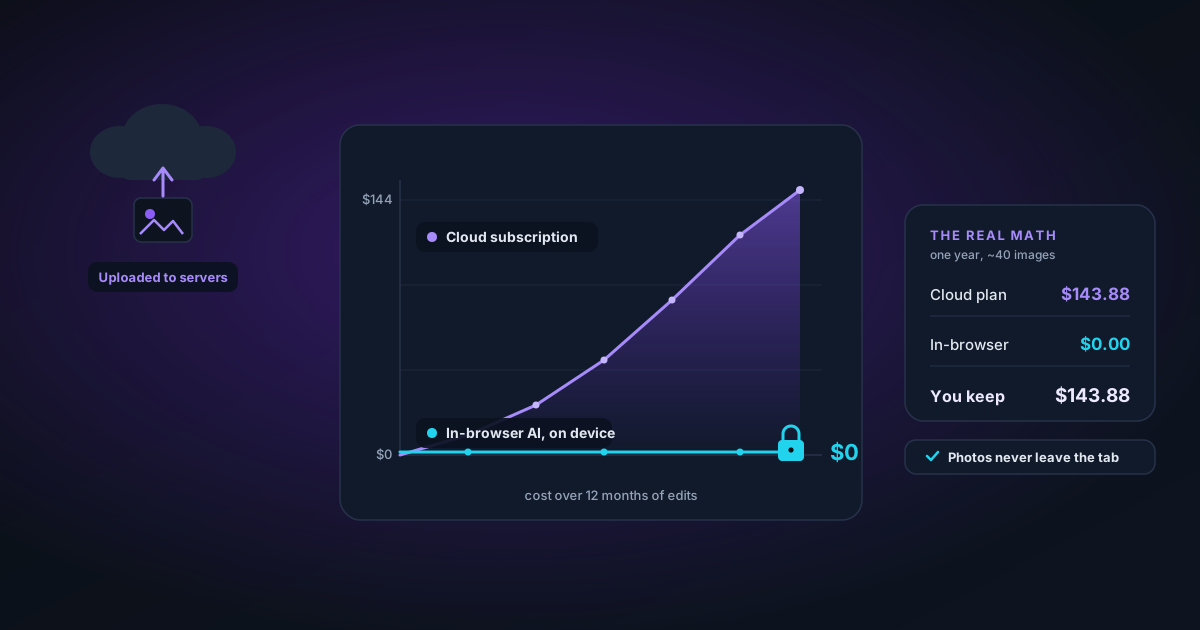
The Real Math: What In-Browser AI Saves You Versus a Cloud Subscription
Cloud background removers charge per image or per month and process your photos on their servers. Here is the actual cost-and-privacy comparison against a tool that runs the AI on your own device — with the numbers worked out.
By Novus Stream Solutions Editorial Team · Part of the Product, privacy, and trust topic cluster
Most articles comparing in-browser AI to cloud tools wave at "privacy" and move on. That's the easy half. The harder, more persuasive half is the money — because for anyone processing more than a trickle of images, the cloud subscription model quietly becomes the most expensive part of their workflow. Let's do the arithmetic, then come back to privacy.
The cloud pricing trap, in numbers
Cloud background removers almost all use one of two models: a credit system (you buy packs of N images) or a monthly subscription with a cap. Both are designed around a metered server cost — every image you process runs on their GPU, and they pass that cost to you with margin.
Walk through a realistic seller's year. Say you list 40 new products a month, each photographed from 5 angles. That's 200 images a month, 2,400 a year. On a typical credit model at roughly 20–40 cents per high-resolution image, that's $480 to $960 a year — for cutouts. On a "value" subscription capped at a few hundred images a month, you'll blow the cap in a busy season and pay overage on top.
The cost scales with your success. The more you sell, the more you photograph, the more you pay. That's backwards.
Why on-device AI breaks the meter
When the AI model runs in your browser, there is no per-image server cost to pass on, because there is no server doing the work. The same neural network that a cloud tool runs on a rented GPU runs instead on your own machine's GPU (via WebGPU) or CPU (via WebAssembly). You already paid for that hardware. The marginal cost of the 2,401st image is exactly zero.
The model downloads once — a few tens to a few hundred megabytes depending on the tool — and is cached in your browser. After that first download, you can process ten thousand images offline on a plane and it costs nothing. There is no meter to run.
That's not a discount. It's the absence of the thing being metered.
"Is the quality worse, then?"
This is the fair question, and the honest answer is: the model is the same class of model. Browser tools run the same family of segmentation networks (RMBG, BiRefNet) that cloud tools run. The difference isn't model quality — it's where the matrix multiplications happen. A modern laptop's GPU is perfectly capable of running these networks; the only real cost is a longer first-time download and a few extra seconds per image on older hardware.
Where the cloud genuinely wins is on a very old or very low-powered device with no usable GPU. There, server hardware is faster. For most people on a machine from the last five years, the gap is seconds, not quality.
Now the privacy half — and why it's not separate
Here's the part that ties money and privacy together: a cloud tool has to upload your image to charge you for it. The metering and the data exposure are the same mechanism. The moment your photo leaves your device, you're trusting that company's retention policy, their security, and their willingness to not train on or resell your images.
For a hobbyist that might be an acceptable risk. For a business it often isn't:
- Unreleased products photographed before a launch are competitive intelligence.
- Client work under NDA can't legally be uploaded to a third party's servers.
- Photos of people — staff headshots, customers, your own family — carry consent and biometric concerns the instant they hit someone else's database.
When the AI runs in your browser, none of that applies, because the image never travels. You can verify this yourself: open your browser's network tab while you process an image and watch — there's no upload request carrying your photo out.
The honest tradeoffs
In-browser AI isn't free of cost; it relocates the cost:
- First-load download. You pay once in bandwidth and a short wait while the model downloads and caches. After that, nothing.
- Your device does the work. A long batch will spin your laptop's fans. A cloud server would've done that instead — but it would've charged you for it.
- Device variance. Results are consistent, but speed depends on your hardware. A flagship phone and a six-year-old laptop will both finish; one just waits longer.
We wrote a deeper engineering breakdown of these tradeoffs in We Run the Model in Your Browser Instead of Our Server.
A quick decision guide
| If you... | Cloud subscription | In-browser AI |
|---|---|---|
| Process a handful of images ever | Fine | Fine — and free |
| Run a growing catalogue | Cost scales with success | Flat zero forever |
| Handle NDA or pre-launch images | Risky | Safe by design |
| Work offline / on the move | No | Yes |
| Use a very old device with no GPU | Faster | Slower but works |
Try it without spending anything
The honest test is to run your own images through both and compare. Drop a photo into the background remover — no account, no credit card, no upload. If the result holds up against what you're paying for, the math has already made the decision for you.
Was this article helpful?
Your answer is saved in this browser only. This control makes no network request and does not send the answer to an NSS feedback endpoint.