What Your Videos Know About You: Stripping Hidden Metadata Before Sharing
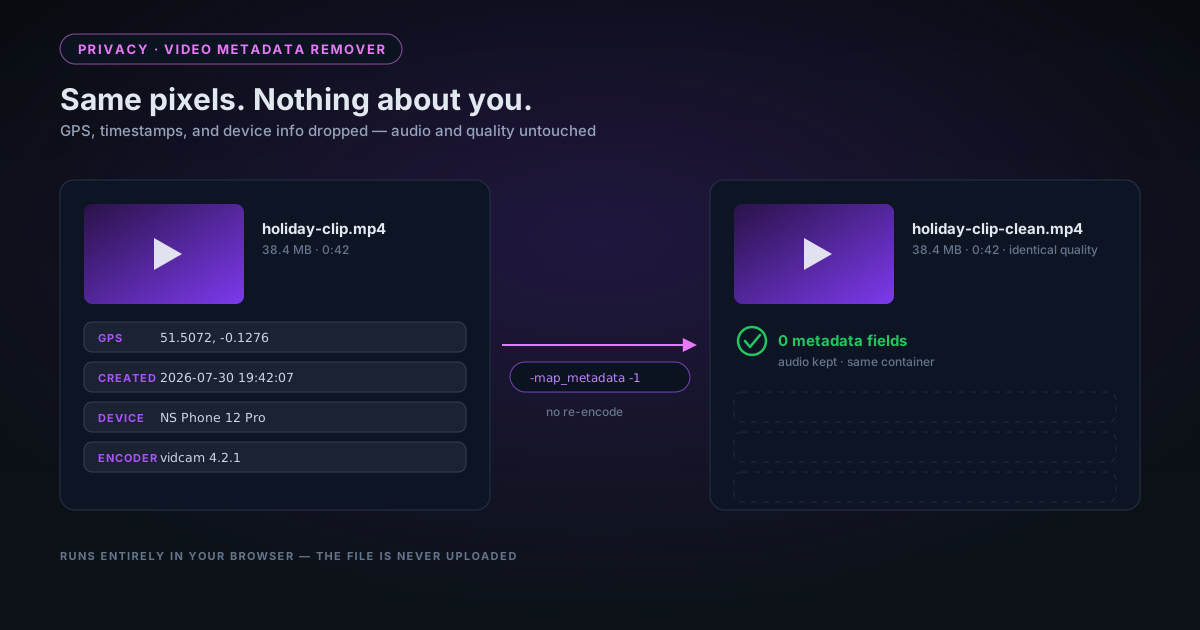
Videos recorded on a phone carry GPS coordinates, device details, and precise timestamps in the file itself. Here is what a video file actually embeds, how our in-browser remover strips it without re-encoding a single pixel, and — honestly — what stripping cannot remove.
By Novus Stream Solutions Editorial Team · Part of the Browser-local editing workflows topic cluster
By now, many people know to strip the EXIF data from photos before posting them — the GPS coordinates, the device model, the timestamp. Fewer people realise their videos carry the same payload, and often more of it. A clip recorded on a phone and sent as-is can reveal where you live, what you filmed it with, and exactly when you pressed record.
The file plays identically either way, which is the problem: there is no visible difference between a clean video and one that announces your home address to anyone who checks. This post covers what a video file actually embeds, how to strip it in your browser without uploading the footage anywhere, and — because stripping has real boundaries — what it cannot remove.
What a video file records besides the video
Container formats like MP4 and MOV reserve dedicated space for metadata, and recording apps fill it enthusiastically:
| Field | Typical content | Why it matters |
|---|---|---|
| GPS location | Latitude/longitude, often to a few metres | Filmed at home? The file contains your address |
| Creation time | Date and time recording started, to the second | Places you somewhere at a specific moment |
| Device make and model | Phone or camera identification | Fingerprints your hardware across uploads |
| Software / encoder | The app and encoder version that wrote the file | Narrows down your device and habits |
| Author, title, comments | Names or usernames some apps write | Can identify you directly |
Phones are the worst offenders. A smartphone video typically stores its location as an ISO 6709 coordinate string in the container's metadata atoms, alongside the device model and the exact recording time. None of it is visible during playback; all of it travels with the file through copying, renaming, and most direct-transfer methods. Anyone with a metadata inspector — or, for some fields, a file-properties panel — can read it.
Two cases deserve particular caution: marketplace listing videos (recorded where the item is, which is usually where you are) and dashcam or doorbell footage shared publicly, which pairs a location with a routine. If you have ever checked what is inside an AI-generated image, the lesson is the same — files carry stories about their origins.
Where the data lives — and why stripping is even possible
The useful mental model: a video file is a container holding compressed video and audio streams plus a labelled shelf of metadata. The metadata is not woven into the pixels. It sits in its own structures — udta atoms and key/value stores in MP4 and MOV, tag elements in WebM — separate from the streams themselves.
That separation is what makes clean removal possible. You do not need to touch the picture to remove the labels; you need to rewrite the container around unchanged streams and simply decline to copy the shelf across.
How the remover strips everything without touching quality
The video metadata remover does exactly that rewrite, on your device, using an ffmpeg engine compiled to WebAssembly and running in a background worker. Drop in an MP4, WebM, or MOV, and it performs a stream copy: the compressed video and audio are copied bit-for-bit into a fresh container created with its metadata map explicitly emptied.
The properties that follow from that design, stated precisely:
- Quality is identical. Nothing is decoded or re-compressed — the output holds the same encoded pixels and samples as the input.
- Audio is preserved. The audio stream is copied alongside the video.
- The container stays the same. An MP4 comes back as an MP4, ending in
-clean.mp4— no forced conversion to another format. - It is fast. Copying streams is bounded by your device's speed, not by re-encoding time.
- Nothing is uploaded. The engine is a one-time download of about 32 MB, cached for next time; your footage never leaves the browser. That is the same one-time-use principle the rest of NSS is built on.
We should be honest about our own history here: the first version of this tool worked by replaying the video onto a canvas and re-recording it. That did strip metadata — but it silently dropped the audio track and re-compressed every frame. The current stream-copy pipeline replaced it precisely because a privacy tool should not quietly cost you quality, and we would rather a tool fail loudly than degrade silently.
What stripping does not remove
A metadata strip cleans the container. It does not, and cannot, clean the content — and a privacy tool that implies otherwise is lying to you.
| Still present after stripping | Why |
|---|---|
| Anything visible in the frame | Faces, number plates, street signs, and on-screen timestamps are pixels, not metadata |
| Duration, resolution, frame rate | Structural values the container needs for playback |
| Encoder notes inside the video bitstream | Some encoders write a settings string into the compressed stream itself, which a stream copy preserves |
The first row is the one that matters most in practice. If the concern is a readable licence plate or a bystander's face, that is a job for the object remover in the video editor, which can blur or pixelate a region across every frame — use it before stripping, then strip the edited file.
The last row is a genuinely obscure edge: container metadata is what inspectors, platforms, and casual snoops read, and it is fully removed. But a determined analyst can find encoder fingerprints inside the compressed stream itself. If your threat model includes that, a full re-encode through the video format converter replaces the bitstream entirely — at the cost of a generation of quality.
When to strip
The habit costs a few seconds, so the honest answer is: before any video leaves your control.
- Before posting to social platforms — some strip metadata on upload, some do not, and the file you hand over contains the data either way
- Before marketplace listings filmed at home
- Before sharing dashcam, doorbell, or security footage
- Before sending clips to buyers, clients, or anyone you do not know
- Before publishing footage where the recording time or place is itself sensitive
One habit, both media
Videos and photos leak the same way, so it is worth pairing the tools. The image metadata remover goes further than its video sibling — it inspects the file first and reports exactly what it carries, including AI-provenance data like C2PA manifests, then lets you strip all of it or a selection. The reasoning behind keeping all of this on-device is laid out in privacy-first image editing.
The video workflow, end to end:
- If the frame itself shows something sensitive, blur or remove it in the editor first.
- Drop the clip into the video metadata remover — first run fetches the engine once.
- Download the
-cleanfile and check the size: near-identical to the source, because nothing was re-encoded. - If the file is too large for its destination, compress the clean copy with the video compressor — the output of a fresh encode carries no old metadata either.
- Share the clean copy; keep the original private.
The clip looks the same, plays the same, and weighs the same. The only thing missing is the part that was about you rather than about the video.
Applies to NSS Background Remover v2.3.0 — the release that was current when this article was published.
Was this article helpful?
Your answer is saved in this browser only. This control makes no network request and does not send the answer to an NSS feedback endpoint.